Routes and next stop
Drivers can view the active route, stop order, customer details, delivery notes, and next stop.
Mobile driver app
RO Driver shows drivers their assigned work, trip offers, route updates, next stop, navigation handoff, active trip tracking, and delivery confirmation tasks.
RO Driver is provided through delivery companies using Route Optima.
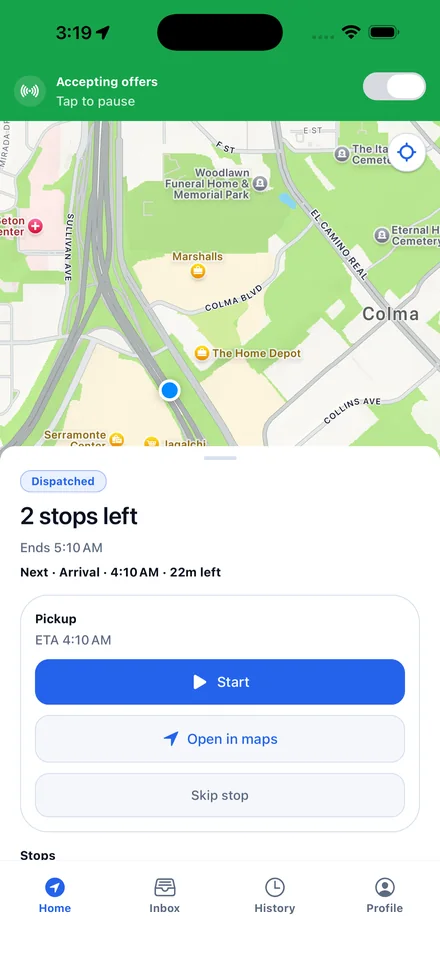
The app gives drivers the route information and stop actions needed during active delivery work.
Drivers can view the active route, stop order, customer details, delivery notes, and next stop.
Dispatch can offer nearby work to available drivers. Drivers accept or decline in the app.
When dispatch adds a stop or the route changes, drivers receive the update on their phone.
During active work, the app can share driver location and trip progress with dispatch.
Open turn-by-turn directions from the current stop without copying the address into another tool.
Complete each stop with the details required by the operator, such as notes, photo evidence, signatures, or completion status.
The app can use the operator's company identity for the driver experience.
Driver workflow
RO Driver keeps route details, new offers, route changes, trip progress, and delivery completion steps in the same app.
Open the app, review the route, and start with the first pickup or delivery.
Review new trip offers and accept or decline them from the app.
Receive added stops, timing changes, and route adjustments from dispatch.
Capture the required proof and close the stop before moving on.
Drivers can contact support for account access, app issues, and questions about using the mobile app.