Trip 215DRV-12 · 8 stops
In progress

Route optimization for delivery fleets
Routes that replan themselves when orders land.
Busy-day analyses for delivery fleets showed 15–40% less distance and drive time with Route Optima. Plans stayed current all day while respecting delivery windows, capacity, and driver rules.
Thanks — we’ll be in touch within 1 business day.
- Free busy-day analysis
- Reply within 1 business day
- Free 14-day live trial
- Unlimited orders
Trips
30 open tripsTrip 198DRV-08 · 6 stops
Dispatched
Trip 220Unassigned · 5 stops
Pending
15–40% less distance and drive time in busy-day analyses for delivery fleets
~2,000 orders per day per fleet supported at high volume
- Built for
- Courier & parcel
- F&B and grocery distribution
- E-commerce last mile
- Water & gas delivery
- Wholesale distribution
Constraints
If a routing rule is missing, we add it.
- Time windows
- Vehicle capacity
- Road and vehicle restrictions
- Driver skills
- Zones
- Pickup/drop pairing
- Service time
- Client-specific rules
Onboarding
We set it up with you.
The first setup and training are included. We stay for the early live days.
- 01Map the operating rules
We work through routes, vehicles, drivers, clients, and exceptions.
- 02Configure and verify
We run real days, resolve infeasible rules, and review the output with dispatch.
- 03Train the team
Dispatchers learn review and manual control. Drivers learn RO Driver.
- 04Stay through rollout
We follow the early live days closely and adjust your routing rules where needed.
Pricing
Launch pricing Limited to a set number of early customers.
Start
$99/month
Up to 6 drivers
RunMost common
$199/month
Up to 15 drivers
Fleet
$399/month
Up to 40 drivers
Scale
$12/driver/month
41+ drivers · no driver cap
Included at $99
| Route Optima $99 | Shipday $259 2,500 orders/month | Onfleet $619 | OptimoRoute $264.60 | |
|---|---|---|---|---|
| Unlimited orders | ✓ | ✕ | ✕ | ✓ |
| Automatic replanning | ✓ | ✕ | ✕ | ✕ |
| Auto-dispatch | ✓ | ✓ | ✕ | ✕ |
| Setup and training | ✓ | ✕ | ✕ | ✕ |
| White-label | ✓ | ✕ | ✕ | ✕ |
| Unlimited dispatchers and access control | ✓ | ✕ | ✓ | ✓ |
| Business client portal | ✓ | ✕ | ✕ | ✕ |
| Mobile app for drivers | ✓ | ✓ | ✓ | ✓ |
| Real-time order tracking | ✓ | ✓ | ✓ | ✓ |
| Proof of delivery | ✓ | ✓ | ✓ | ✓ |
| Route history | ✓ | ✓ | ✓ | ✓ |
| Analytics | ✓ | ✕ | ✓ | ✓ |
| Manual route control | ✓ | ✕ | ✓ | ✓ |
| Tracking-link feedback and driver ratings | ✓ | ✕ | ✓ | ✓ |
| API access | ✓ | ✓ | ✓ | ✓ |
Try it on your real operation before you pay
Free busy-day analysis → tailored setup → free 14-day live trial
Start with a free analysis
Prefer a call? Book a 30-min intro
Busy-day analysis
Send one real day. Get a comparison
-
01
Send a day you already ran
-
02
We rebuild it under your rules
-
03
You get the comparison to see if it's right for you
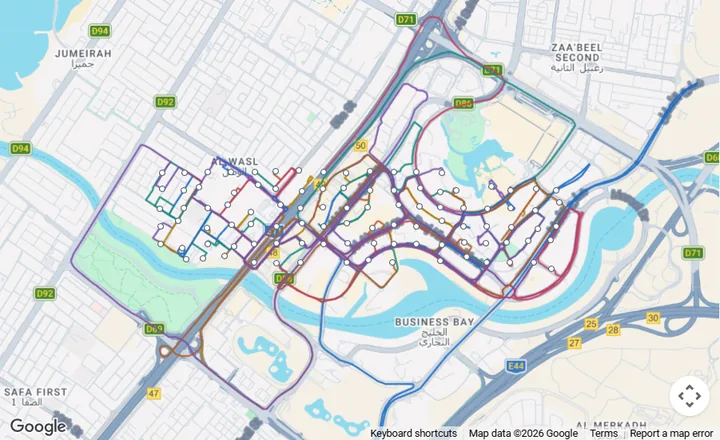
Original
Optimized
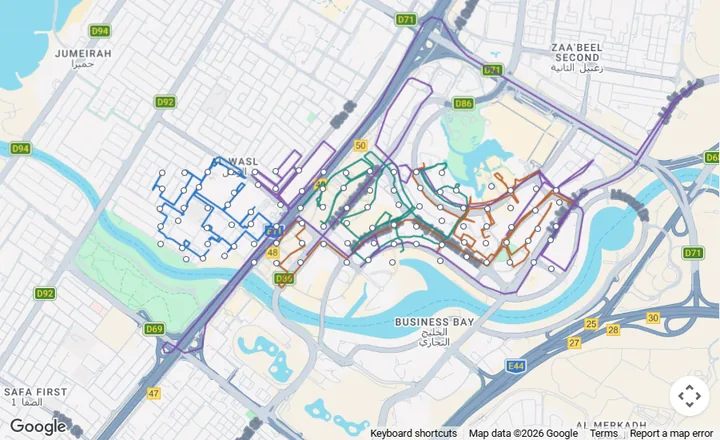
Distance325.42 → 205.01 km−37.0%
Drive time564.0 → 355.3 min−37.0%
Routes10 → 4
See the full sample report
- Something changes
- Someone notices
- Click Assign
- Run Optimize
- Send update
- Something changes
- Plan updates automatically
- Driver sees it
App for drivers
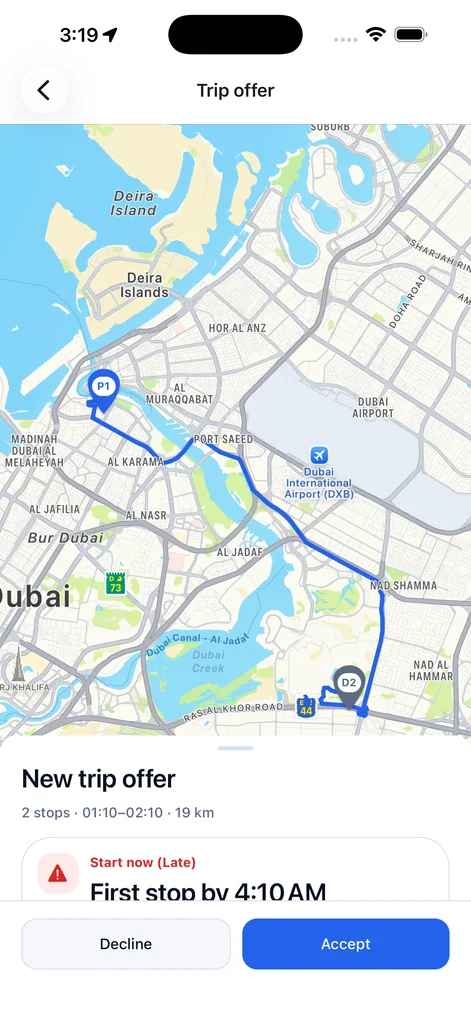
Drivers get the updated stops in RO Driver. Live location, navigation, and proof of delivery are in the same app.
RO Driver details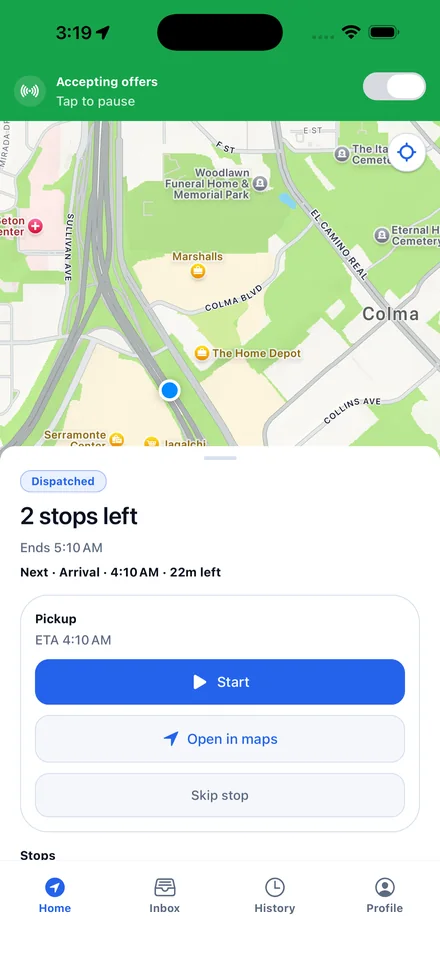
Questions
Before you send a day.
What happens to a driver who is already on the road when the plan changes?
A route a driver is already running does not get rewritten underneath them. Planning can add work to the end of it, and that arrives as an offer the driver can decline. Stops already closed stay closed.
Can we stop it from changing a route?
Yes. Dispatch sees the proposal before it goes out and can revise stops, split a route, adjust timing, or take manual control of the plan and keep it.
Can we freeze a route so planning leaves it alone?
Yes. A trip can be frozen, and planning will stop proposing changes to it. Use it for the routes you have already promised to a driver or a client while the rest of the day keeps replanning.
How do drivers get their work?
Two ways. Dispatch assigns a route to a driver directly, or the trip goes out as a timed offer. Offers go to the nearest available driver first and move down the list from there.
What if a driver declines the offer, or just ignores it?
The offer has a clock on it. If the driver declines or the time runs out, it moves to the next available driver. If nobody takes it, the trip goes back to dispatch and shows up in the list of trips needing manual dispatch rather than sitting unassigned.
What if there is more work than our drivers can take?
It does not get quietly forced onto a route. Work that will not fit your windows, capacities, and driver rules is held for the next planning run or flagged for dispatch to place by hand.
How does dispatch find out a stop is going to be late?
The console opens on the exceptions rather than a wall of averages: stops at risk, stops already overdue, trips that need manual dispatch, and drafts still missing details. The idea is that dispatch sees the alert on the screen before the customer calls.
What proof do drivers capture at a stop?
A photo and the completion status before the stop closes. If a stop is skipped or fails, the driver records the reason. It lands on the trip record with the rest of the delivery history.
How do orders get in day to day?
Dispatch creates the work in the console, or your business clients submit their own shipments through their portal and follow the status there. There is also an API with access tokens if you want another system to push orders in. If your orders live somewhere else today, tell us and we will confirm the practical way to connect it.
Can your business clients see their own deliveries?
Yes. Each client organization gets its own portal: submit a shipment with pickup, drop-off, and window, watch the status change, and copy the tracking link. Dispatch sees that work in the same pipeline without typing it in again.
What does the end customer see?
A tracking page with live status, the ETA window, the driver on the map when location is available, a progress timeline, and proof of delivery once the stop closes.
Will our customers see your brand or ours?
Yours. The console, the driver app, the client portal, and every tracking link a customer opens carry your company identity, not ours.
Is this a TMS for freight?
No, and it is worth being clear about it. Route Optima is built for last-mile delivery: planning, dispatch, driver execution, client intake, and customer visibility. It does not do freight forwarding, container tracking, or carrier rate procurement.
How much will we save?
The 15–40% range is from busy days delivery companies sent us, on distance and drive time against the plan they were running. It is not a guarantee. It moves with your geography, how dense your orders are, and how good the current plan already is. That is the point of sending one day.
How many orders can it handle?
About 2,000 orders a day for a single fleet. How far that goes in practice depends on how complex your rules are and how often you replan, which we check on your own day.
What happens after the analysis?
We go through the comparison with you. If it holds up, we configure your rules, run real days with dispatch, and train the team, then start a free 14-day live trial on your real operation. You pick a paid plan after the trial, not before.
What happens to the file we send?
It is used only to build your comparison, shared with no one, and deleted on request. We need addresses and timings. If some columns are sensitive, strip them and we will tell you if anything essential is missing.
Start with a conversation
Tell us how your delivery operation works.
We’ll reply within 1 business day to understand your routes, constraints, and systems, then agree on the most useful next step.